Projects In progress
How we built Nertz Studio on Cloudflare Workers
Why two WordPress developers built studio.nertzdigital.com on Cloudflare Workers, and what we're learning along the way.

WordPress is home turf for us. nertzdigital.com runs on it, and most of the sites we build for clients do too. When we decided to give our games, music, and experiments their own home, WordPress was the obvious first choice.
We didn't use it. This page explains why, how the studio works instead, and what we've learned. Cloudflare Workers is new to us, so this is a living case study. We'll keep adding to it as the site grows.
This write-up is AI-assisted. We draft and edit it with AI tools, the same way we build the site, and review every change before it's published.
What we needed
Nertz Studio is where we publish what we make for fun:
- Playable browser games built with HTML, CSS, and JavaScript. Each one is a self-contained app with its own files, sprites, and sound.
- Music: tracks, artwork, and the story behind them.
- Experiments: prototypes, tools, and whatever we get curious about next.
The thing we're publishing is the product. A game isn't a blog post with some text around it. It's an app that needs to load fast, run on its own, and not fight with anything around it.
Why not WordPress
We could have built this on WordPress. We know exactly how we would have: custom post types for Games, Music, and Projects, custom fields for covers and credits, and a lightweight theme.
The problem was the games. They would never really live inside WordPress. Each build would sit in a folder next to the install, uploaded by hand, with WordPress acting as a catalog that links out to them. At that point WordPress is mostly managing listing pages, and we'd still be keeping PHP, a database, a theme, and plugins updated and secure for a site that's mostly static files.
We also didn't need what WordPress is best at. Its biggest strength is the admin: logging in, clicking Add New, and publishing without touching code. For client sites, that's essential. For two people who build the projects in code anyway, it's an extra layer between us and the work.
Why Cloudflare Workers
Cloudflare Workers runs code on Cloudflare's global network, and Workers Static Assets serves files (HTML, CSS, images, audio) from that same network. For this site, that was a near-perfect fit:
- Games are just files. A browser game is HTML, JavaScript, and assets. Static hosting at the edge is the fastest, simplest way to serve that, with no server-side code running on every play.
- Static requests are free. Cloudflare doesn't charge for requests to static assets, which matters for a hobby site that might host a lot of media.
- Deploys happen on merge. Cloudflare builds and deploys the site whenever we merge a change into
mainon GitHub, and every deploy is saved as a version we can roll back. - Room to grow. When we want high scores, achievements, or player profiles, we can add Worker code and a D1 database without changing hosts.
We also chose Workers, not Cloudflare Pages. Cloudflare now recommends Workers with Static Assets for new projects, and that's where new features are going.
How it works
There's no framework, database, or CMS. The site is built from plain files by one small Node script.
studio/
├── content/
│   ├── games/      one Markdown file per game
│   ├── music/      one per release
│   ├── projects/   one per project (like this page)
│   └── pages/      About, etc.
├── play/           playable game builds, copied untouched
├── public/         covers, audio, styles, favicons
├── build.mjs       turns all of the above into dist/
└── wrangler.jsonc  tells Cloudflare to serve dist/
Each project is a Markdown file with a few details at the top:
---
title: Game Title
tagline: One sentence that makes someone want to click Play.
status: released
cover: /covers/game-title.jpg
controls:
  - Arrow keys to move
---

The description goes here, written in Markdown.
The build script reads every file and generates the homepage, the Games, Music, and Projects pages, a page for each project, a sitemap, and a 404 page. If a game folder exists at play/<name>/, the project page gets a Play now button automatically. The game itself is never touched. It's served exactly as we built it.
Publishing a new game looks like this:
- Drop the game into
play/. - Copy the template, fill in the details, and add a cover image.
- Open a pull request on GitHub and merge it. Cloudflare builds and deploys it in about a minute.
The whole build takes under a second.
Editing the site with AI tools
We don't edit pages in an admin screen. We ask an AI tool to make the change, and it comes back as a pull request on GitHub. We don't both use the same tool:
- Cursor. One of us works in Cursor, an AI code editor. Most changes start as a plain-English request, like "make the homepage faster on phones" or "add these screenshots to the case study." Cursor's agent makes the change on its own branch, runs both builds, and opens a pull request. The speed fixes and screenshots in this case study were done this way.
- ChatGPT. The other is connecting ChatGPT to the same GitHub repo, so he can ask for changes there and get pull requests back the same way.
The tool doesn't matter much, because everything meets in the same place. Every change is a pull request, and one of us reads it, checks the page, and merges it. Cloudflare only deploys what lands in main.
A file in the repo called AGENTS.md gives any AI agent its rules. The name is a shared convention that many AI coding tools look for. Cursor reads it, and so does Codex, the coding agent in ChatGPT, so both tools get the same instructions. A few of the rules:
- Never deploy. The agent's job ends at a pull request. A person decides what goes live.
- No warnings. Both the regular and production builds have to finish cleanly.
- Stay small. No new dependencies or frameworks unless we ask for them.
- Keep placeholders private. Test content like our sample game must never be published.
That file is also where we keep the conventions a new collaborator would need: colors, fonts, cover sizes, and how to write. It works for people as well as for agents, and it's what keeps two different AI tools making changes the same way.
How it fits with nertzdigital.com
The main Nertz Digital site is still WordPress, hosted where it's always been. We moved the domain's DNS to Cloudflare, but every record for the main site points to the same server as before. Only the studio subdomain is served by the Worker. Visitors to nertzdigital.com shouldn't notice anything changed.
Making it fast on phones
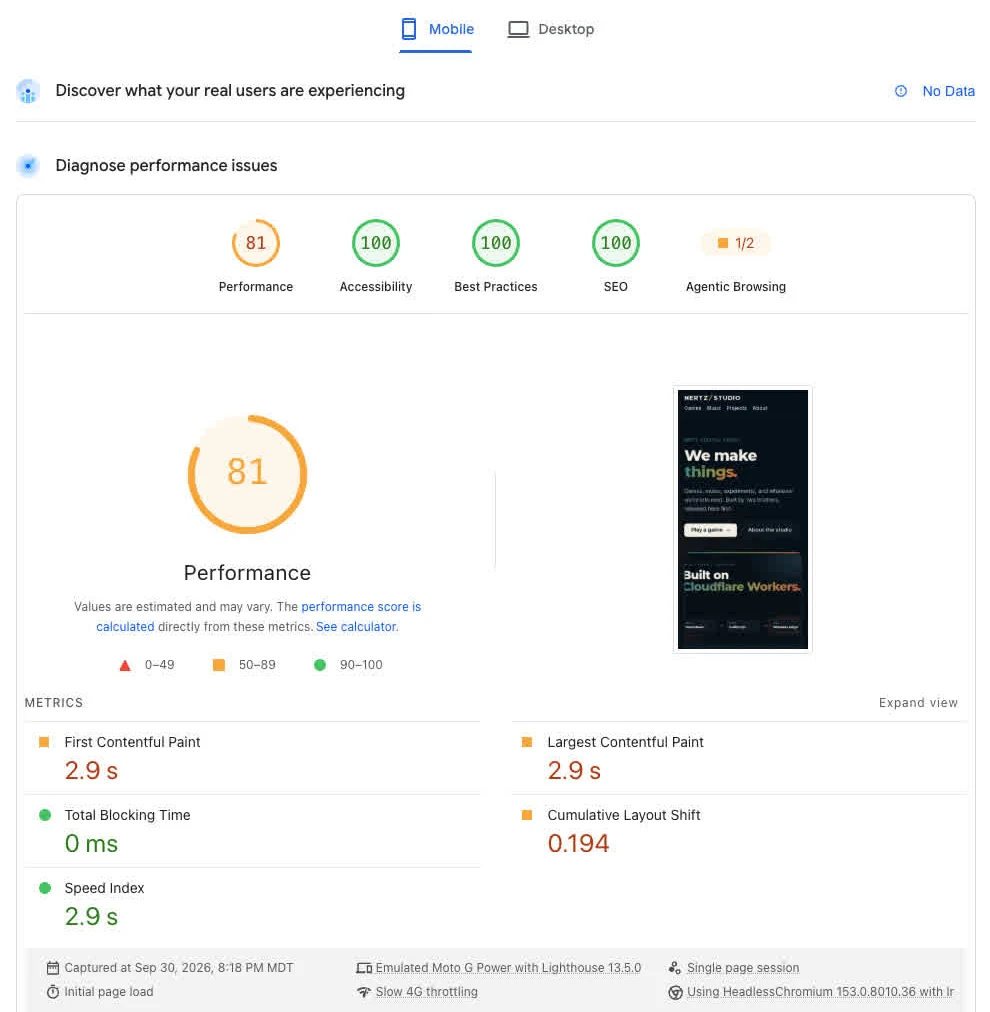
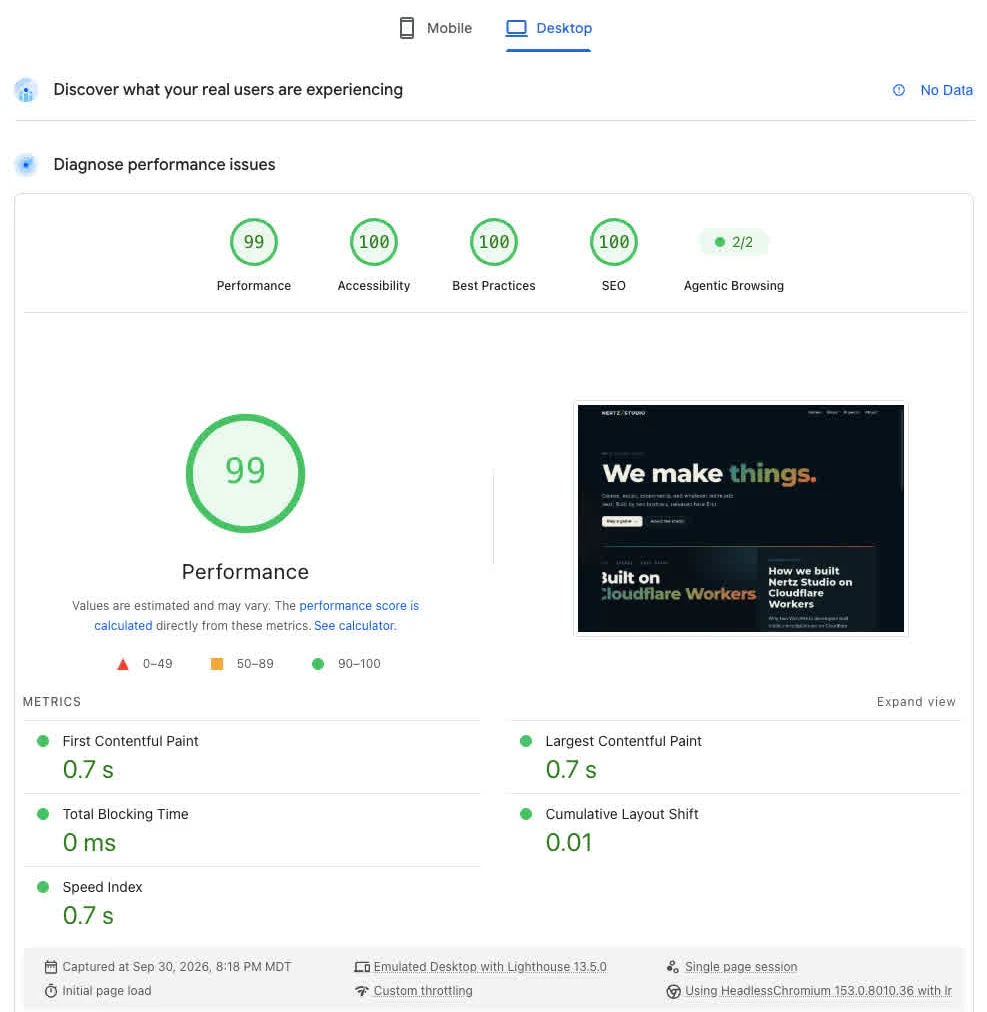
Our first PageSpeed Insights test, on launch night, scored 99 for performance on desktop but 81 on mobile. Accessibility, Best Practices, and SEO were 100 on both. Two things held mobile back:
- The page jumped while it loaded. Cumulative Layout Shift was 0.194, where under 0.1 counts as good. Our headline, "We make things.", fit on one line in the phone's built-in font. Montserrat is wider, so when it finished downloading the headline wrapped to two lines and pushed everything below it down about 50 pixels.
- Text had to wait for other files. Before showing anything, the browser had to download our stylesheet and a Google Fonts stylesheet from a different server. On PageSpeed's simulated phone connection, the first text appeared at 2.9 seconds.
What we changed:
- Self-hosted fonts. The three font files now come from the studio itself instead of Google Fonts. The page tells the browser to start downloading the two main ones immediately.
- Size-matched fallback fonts. If the real fonts are slow, text shows in Arial, resized to take up the same space as Inter and Montserrat. When the real font arrives, nothing moves.
- Stylesheet built into each page. The build script copies the CSS straight into every page's HTML, so there's no extra file to wait for.
- WebP covers in three sizes. Each cover is also saved as WebP at 640, 960, and 1280 pixels wide, and the browser picks the smallest one that looks sharp. On a phone, the homepage cover went from 77 KB to 17 KB.
- Uncropped covers on phones. The featured cover was being cut off at the sides on small screens. It now keeps its full 16:10 shape.
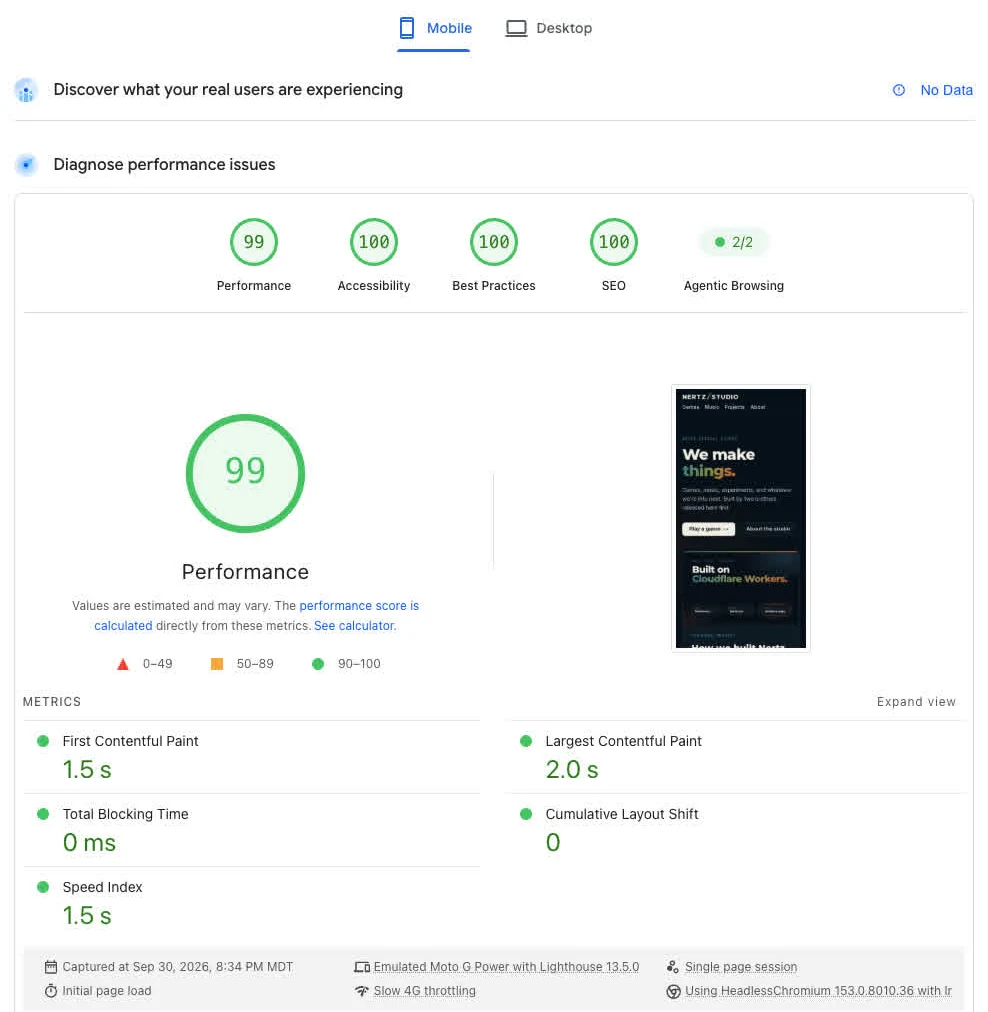
We deployed the fixes the same night and ran PageSpeed Insights again:
| Mobile | Before | After |
|---|---|---|
| Performance score | 81 | 99 |
| First Contentful Paint | 2.9 s | 1.5 s |
| Largest Contentful Paint | 2.9 s | 2.0 s |
| Cumulative Layout Shift | 0.194 | 0 |
| Speed Index | 2.9 s | 1.5 s |
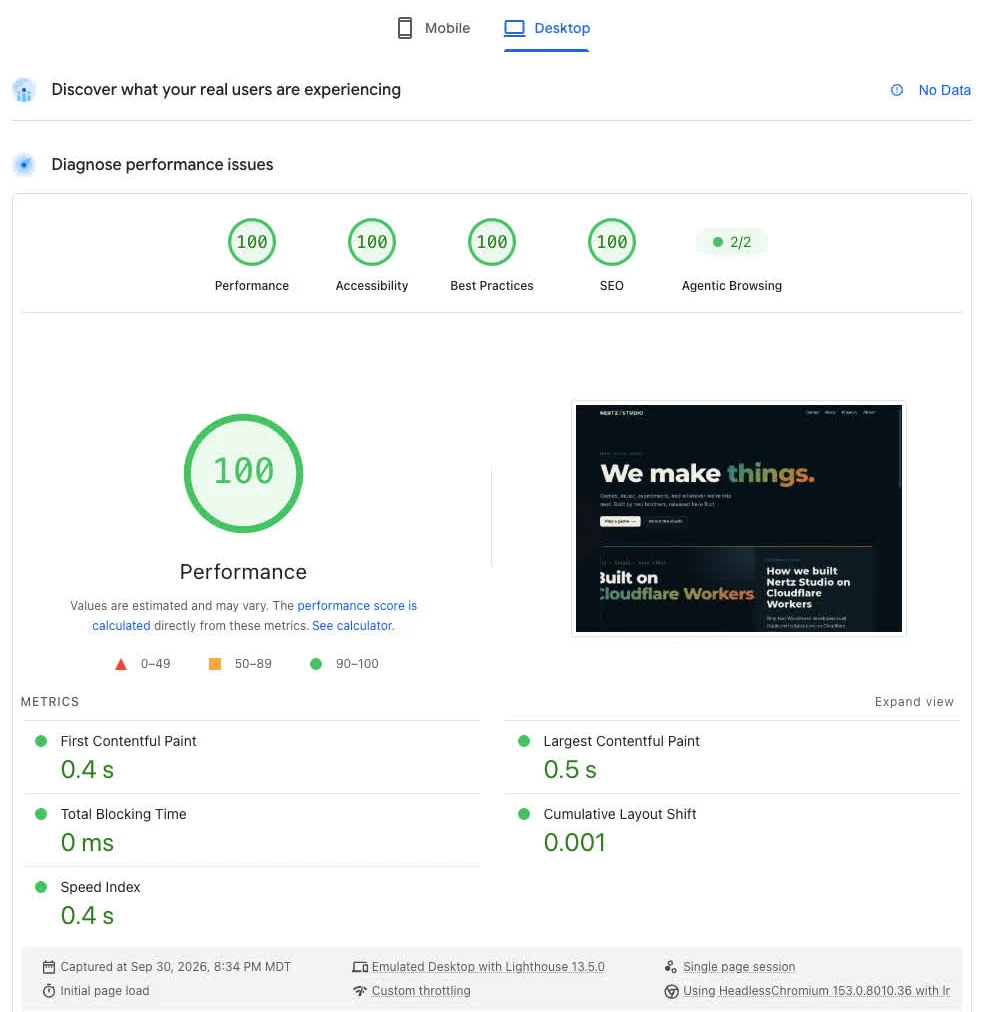
Desktop went from 99 to 100. Accessibility, Best Practices, and SEO stayed at 100 on both.
Here are the reports, before (8:18 PM) and after (8:34 PM). Select an image to see it full size.
Mobile · before
Mobile · after
Desktop · before
Desktop · after
PageSpeed scores move a little between runs, so treat these as a snapshot, not a guarantee.
A closer look at the mobile report
PageSpeed saves frames from the page as it loads. After the fixes, every frame is the same: the headline, buttons, and cover sit in the same place from the first paint to the last. That's what a layout shift of 0 looks like.

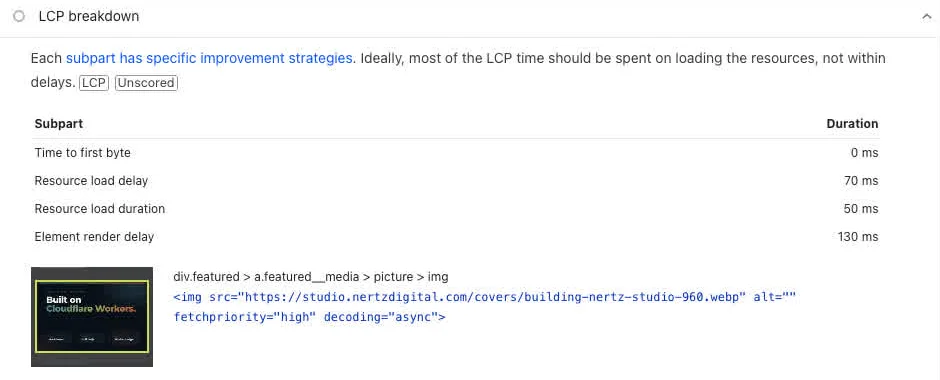
The largest thing on the page is the featured cover, so its load time is the Largest Contentful Paint. PageSpeed breaks it into steps. The browser starts downloading the cover 70 ms after the page arrives, downloads it in 50 ms, and draws it 130 ms later. The download is quick because the phone gets the 18 KB WebP version, and the image is marked high priority in the HTML, so the browser asks for it right away. These step times come from PageSpeed's real, unthrottled page load, while the 2.0-second score is simulated on a slow phone connection, so the totals don't match.
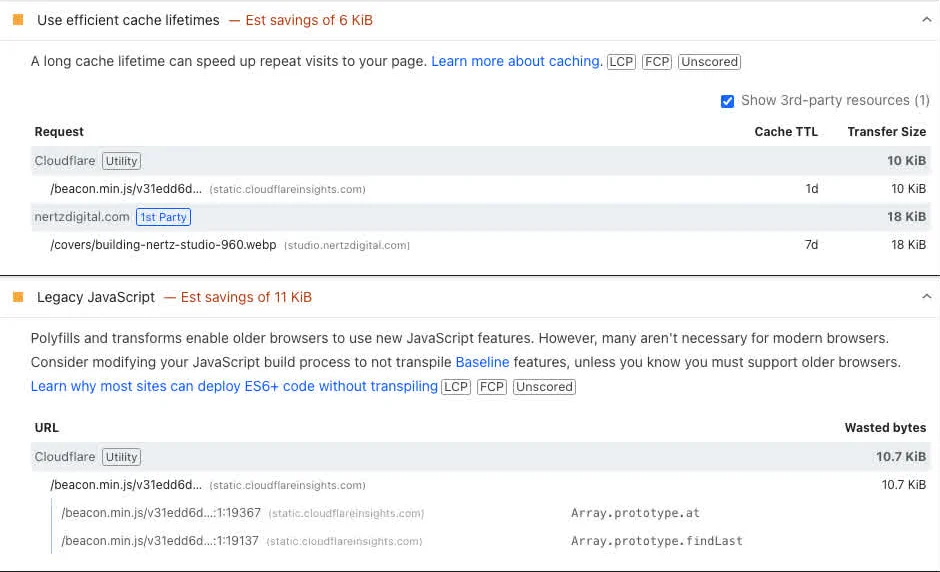
PageSpeed still flags two things. Neither one counts toward the score, and we're leaving both alone for now:
- Cloudflare's analytics script. Cloudflare Web Analytics adds a small script to our pages as they're served. It isn't in our code. PageSpeed would like it cached longer than a day and trimmed of 11 KB of code meant for older browsers, but only Cloudflare can change it. We could turn analytics off, but knowing what people visit is worth more to us than 11 KB.
- Our cover cache. Browsers keep cover images for 7 days, and PageSpeed would prefer a year. When we update a cover, the file keeps the same name, so a year-long cache could show visitors the old one for months. Font files never change, so those are cached for a year.
Deploying from GitHub
For the first few hours, we deployed from a laptop with npm run deploy. That works, but whoever deploys needs Cloudflare's command-line tool signed in, and nothing stops a change from going live before the other person has seen it. So the same night, we put the code in a private GitHub repo and connected Cloudflare's Workers Builds.
Setting it up took about ten minutes:
- Move the repo to our organization. We first created the repo under a personal GitHub account, then transferred it to our NertzDigital organization. That way the code belongs to the business, and both of us can manage it.
- Install Cloudflare's GitHub app. In the Cloudflare dashboard, we opened the Worker, went to Settings → Builds, and clicked Connect. GitHub then asks where to install the Cloudflare Workers and Pages app. We picked the organization.
- Choose the repo and the commands. Cloudflare needs to know which branch counts as production, how to build the site, and how to deploy it.

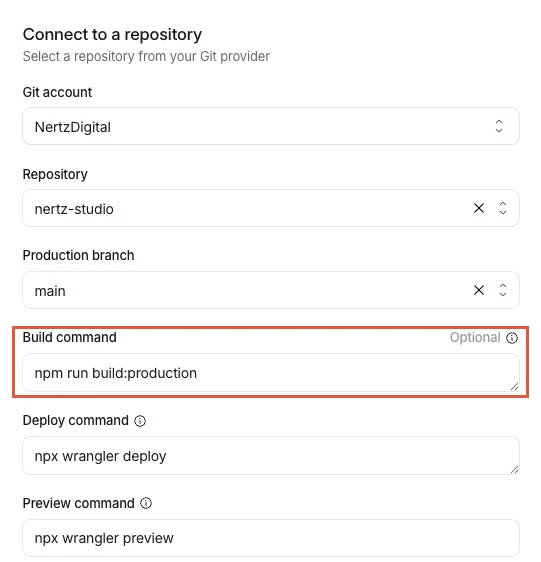
Two settings needed attention:
- The build command. Cloudflare suggested
npm run build. For us, that command includes placeholder content we use for local testing, like a sample game that must never go public. We changed it tonpm run build:production, which leaves placeholders out. If we had accepted the default, the first automatic deploy would have published them. - Preview builds. Cloudflare can build a test version of every branch. Our site has preview links switched off for now, so those builds would just fail. We turned them off and will revisit them when we want a test link for each pull request.
Publishing now means opening a pull request and merging it into main. Cloudflare builds and deploys the site in about a minute, and GitHub shows whether the build passed. The first automatic deploy was the PageSpeed screenshots above. They were live about 30 seconds after we merged.
What we gave up
This setup has real trade-offs, and we'd rather be upfront about them:
- No admin dashboard. Publishing means asking an AI tool for a change, or editing a file ourselves, and merging a pull request. That's fine for us. It would be a dealbreaker for most of our clients. We considered Git-based CMS tools like Pages CMS, Sveltia CMS, and Decap CMS. They add a login screen and forms on top of the same Markdown files. For two people who already make changes through AI tools, it would be one more thing to set up and maintain, so we're skipping it for now. For a quick fix away from the laptop, GitHub's website can edit a file and open a pull request from a phone.
- No plugin ecosystem. Contact forms, comments, and search all have to be built or added on purpose.
- Manual image prep. WordPress resizes uploads automatically. Here, we size and compress cover images ourselves, and save the WebP copies with a one-line command.
For content-heavy sites, or anywhere non-developers need to publish, WordPress is still our go-to CMS, and that covers most of our client work. If something better comes along, we'll take a look. For now, WordPress is what we build on and recommend.
What we've learned so far
- "DNS only" matters for email. When we added the domain to Cloudflare, the imported records defaulted to Cloudflare's proxy (the orange cloud). Proxying the mail records would have broken email, so we switched everything for the main site to DNS only. Only the studio runs through Cloudflare's network.
- Check the defaults. Cloudflare's suggested build command would have published content we never meant to release. Setup screens fill in sensible guesses, not answers.
- Read the warnings, not just the score. The 81 came from a headline wrapping to two lines, which the score alone didn't tell us. After the fixes, most of what PageSpeed still flags is Cloudflare's own script, not anything we built.
- Small is fast. Without a framework, the build has one dependency, the pages are plain HTML, and there's very little to break or update.
What's next
- High scores and achievements for games, using Workers and D1.
- Move large audio files to R2 storage as the music library grows.
Update log
- September 30, 2026: Launched. Homepage, section pages, project pages, and the Markdown build pipeline are in place. DNS for nertzdigital.com moved to Cloudflare, and studio.nertzdigital.com went live on Workers the same evening.
- September 30, 2026: Mobile speed fixes after our first PageSpeed test: self-hosted fonts with size-matched fallbacks, CSS built into each page, and WebP cover sizes. See "Making it fast on phones."
- September 30, 2026: Moved the code to a private GitHub repo and connected Cloudflare Workers Builds. Merging into
mainnow builds and deploys the site automatically.